// setup guide
From your code to the stores, step by step.
Plan about 30 minutes for your first app. After that, every release is one click.
What you need first
- Your app's code on GitHub, made with Expo, React Native, Capacitor or Flutter. If you're not sure, connect it and we'll tell you
- An Apple Developer account, for iPhone
- A Google Play Console account, for Android
- A mobile number that can receive a text
You don't need a Mac, and you don't need to write code or type commands. Builds run on your own GitHub account, and GitHub bills any build minutes under your own plan. A typical full build uses about 18 minutes, or roughly US$0.44 at GitHub's listed rates before any free allowance. We recommend setting a spending limit in your GitHub billing settings.
Create your account
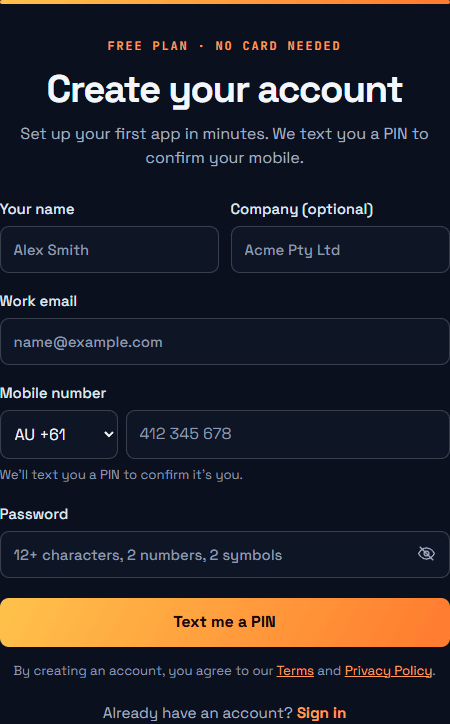
Go to the sign-up page and fill in your details. Your password needs at least 12 characters, with 2 numbers and 2 symbols. Press Text me a PIN, then enter the 6-digit code we text you.
Connect GitHub
In your portal, open GitHub and press Connect with GitHub. GitHub opens and asks which repositories to share. Choose Only select repositories, pick your app, and press Install & Authorize. You'll come straight back.
Choose your app
Press Use this code next to your app. We read its name and details from your code, so there's nothing to fill in.
If your code makes more than one app, such as a customer app and a driver app, we find them all and tick them. Press Add these apps.
Follow the steps on your app's page
Your app's page shows one step at a time, with a link to the exact page you need and what to press:
- Where to publish: iPhone, Android or both
- Connect Apple: create a key on Apple's site, then add the file. About 5 minutes the first time. Every app after that is one click
- Android key: if your app is new, one click creates it. If it's already on Google Play, add the key you've used before
- Connect Google Play: press one button to get your Push200 email, then invite it in Play Console. About 2 minutes
We check each one with Apple or Google the moment you add it. If something's wrong, we tell you what to fix.
Press build
Got several apps from the same code? Build them all in one press, or tick only the ones you want.
Your portal shows each stage as it runs. Your main code is never changed, because each build runs on its own separate branch.
iPhone builds stop in TestFlight. Android builds stop as a draft in Google Play. Google requires your very first upload to be done by hand, once, and your portal tells you when and how.
Go live
Test your build, then submit it for review in App Store Connect and Play Console. Apple and Google review every app, and nothing goes public until you choose.
Stuck?
Email contact@push200.com and tell us which step you're on.
Start with step 1 →